Turkish-character friendlyTürkçe karakter dostu
Handles ş, ğ, ı encoding issues that break compilation in IEEE/ASYU-style templates.IEEE/ASYU tarzı şablonlarda derlemeyi bozan ş, ğ, ı kodlama sorununu çözer.
Edit, compile, and preview in one desktop app, with SyncTeX, offline use, and Turkish-character support built in. Düzenle, derle ve önizle; tek masaüstü uygulamasında SyncTeX, offline kullanım ve Türkçe karakter desteği yerleşik.




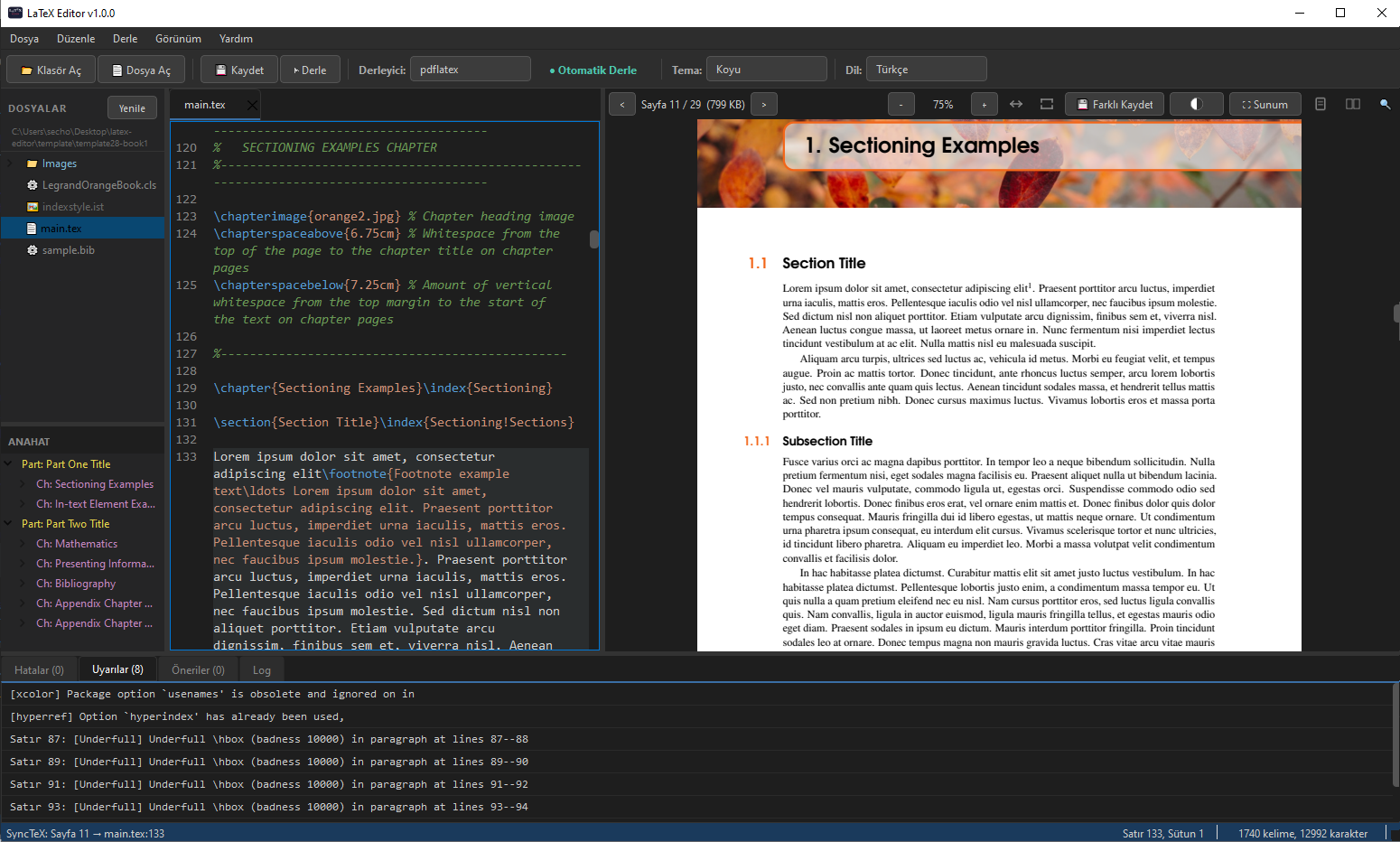
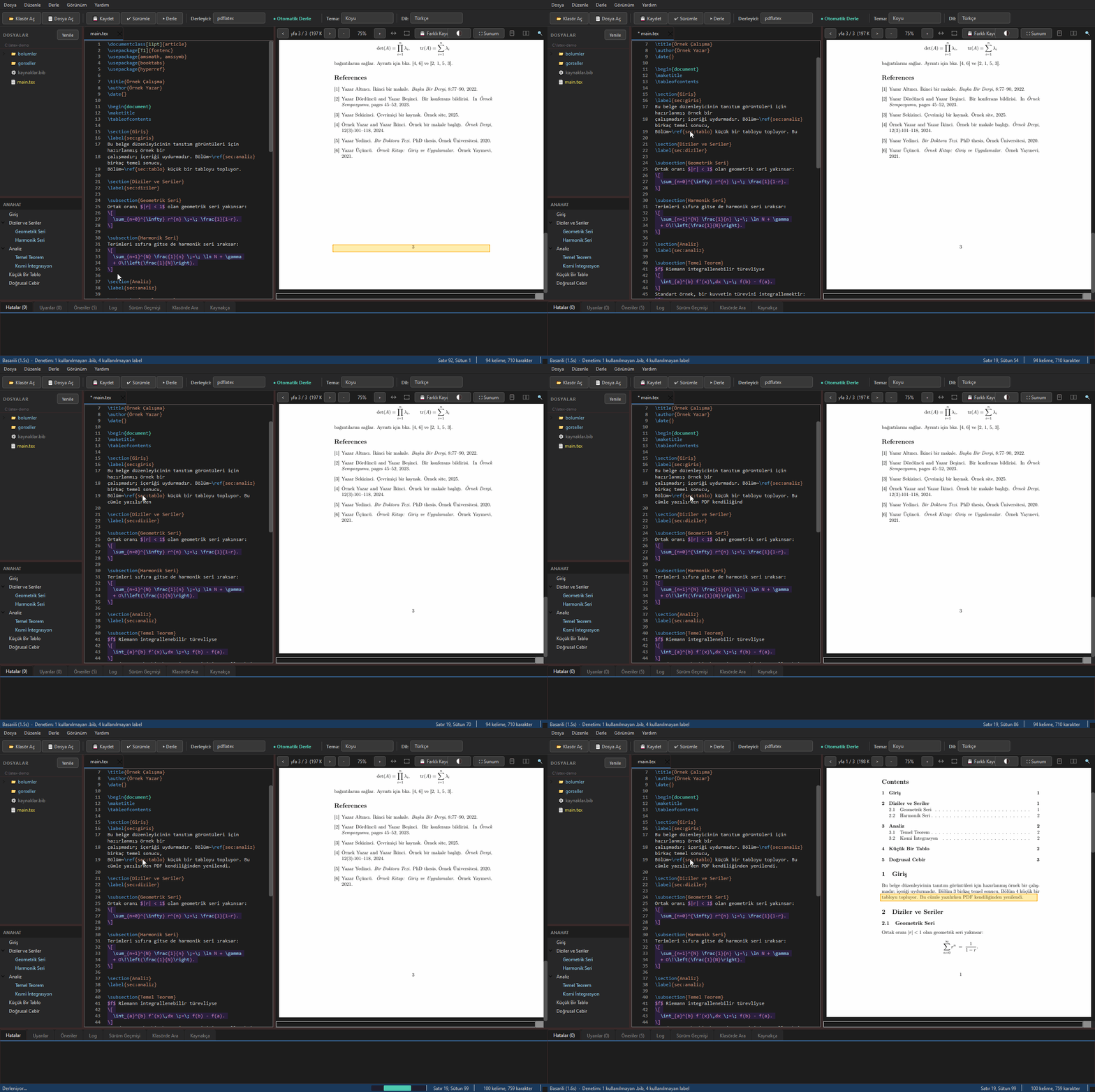
Click a line in the editor and the PDF jumps to it, even across pages. Click the PDF and the editor jumps back to that exact source line. The Overleaf feature you like, but offline and on your desktop. Editörde bir satıra tıkla, PDF o konuma (sayfalar arası bile) zıplasın. PDF'e tıkla, editör tam o kaynak satıra geri dönsün. Overleaf'teki o sevdiğin özellik; ama offline ve masaüstünde.
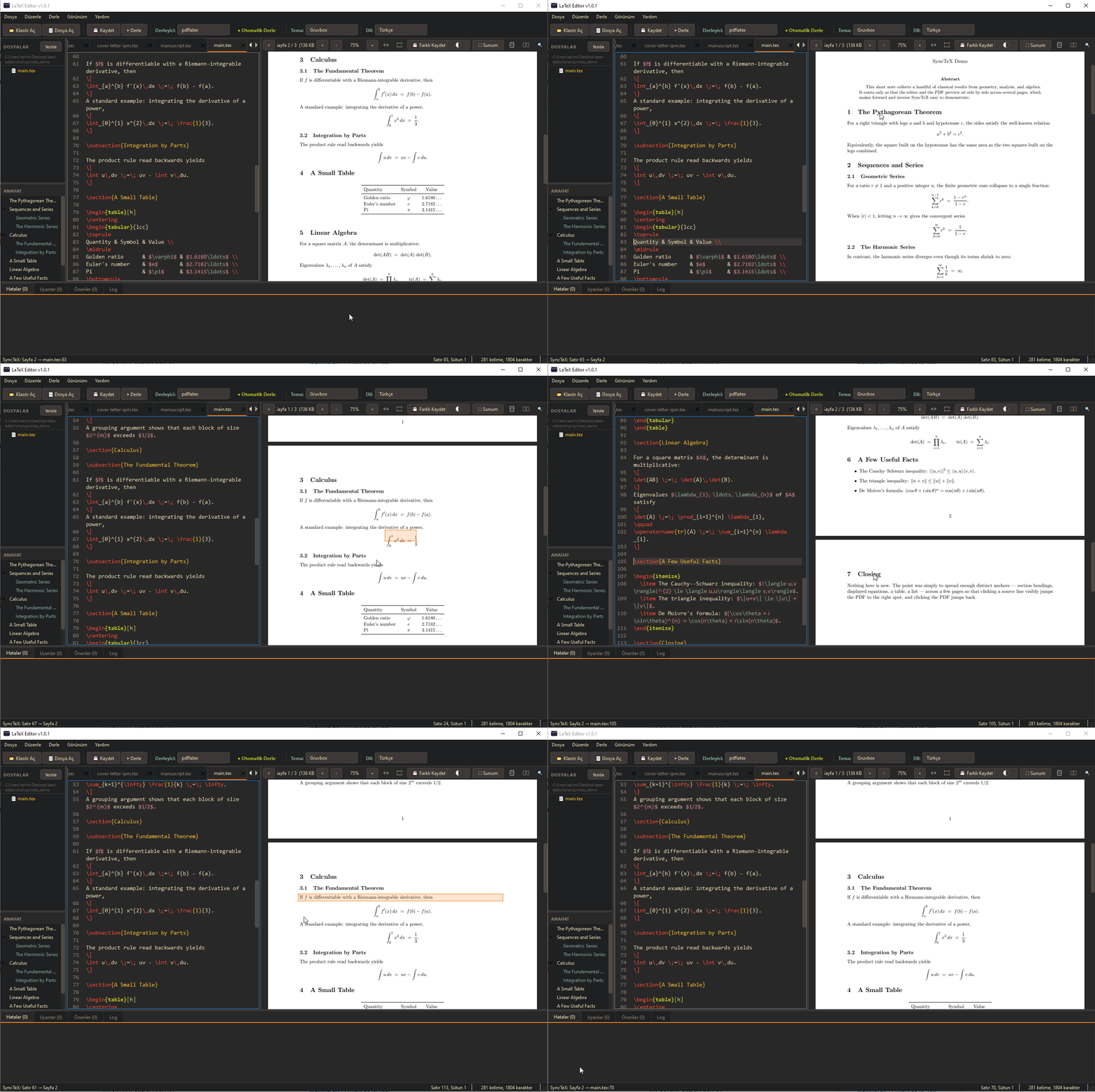
Ctrl+Shift+F searches inside every source file under the project folder, including the ones you never opened. Results list file and line; click one to jump straight there. Ctrl+Shift+F proje klasöründeki tüm kaynak dosyaların içinde arar, hiç açmadıklarınız dahil. Sonuçlar dosya ve satır olarak listelenir, tıklayınca oraya gidilir.
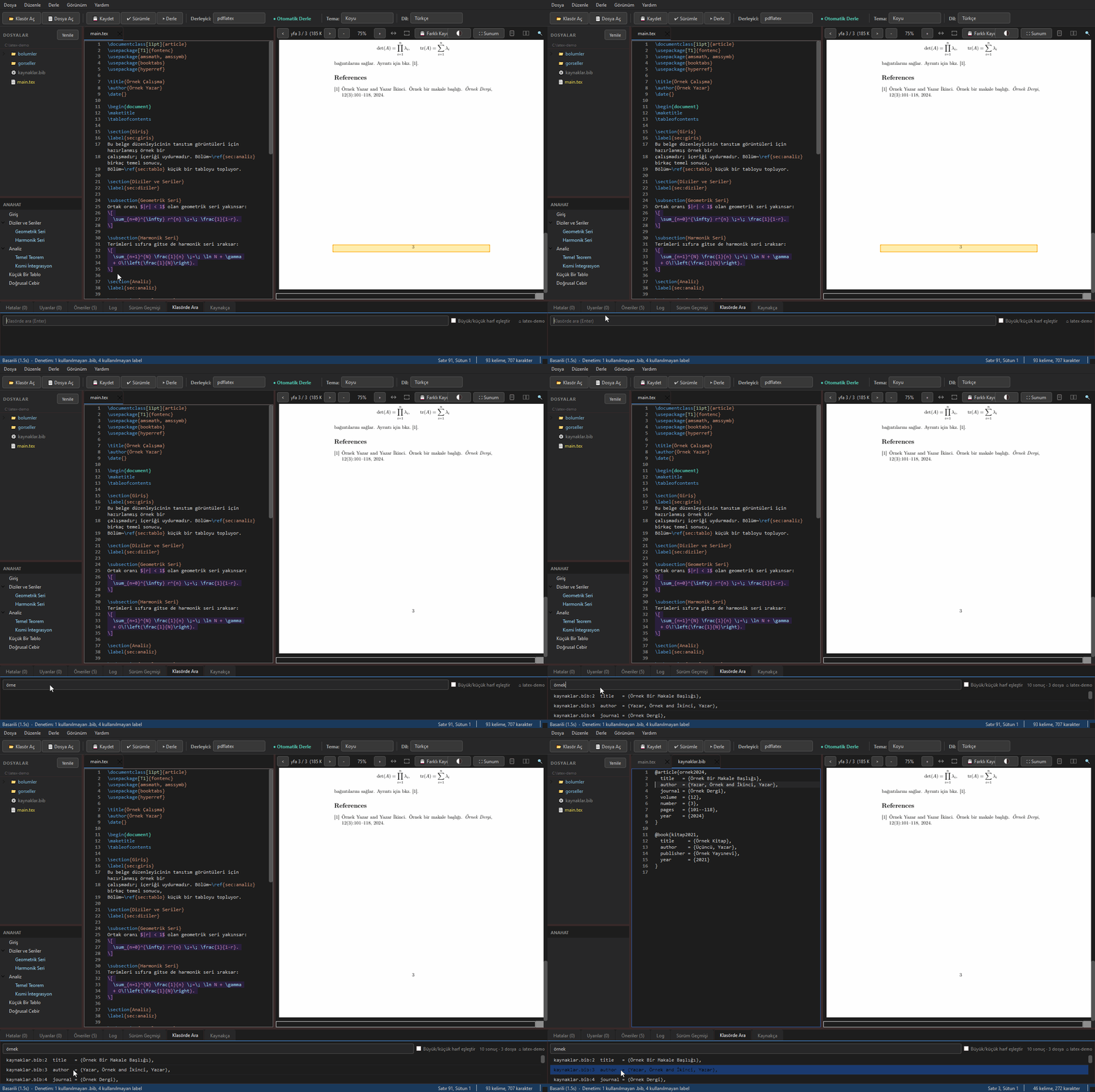
Your .bib file is read into a sortable table: key, type, author, year, title. Filter as you type. Paste a DOI and the record is fetched, shown for review and appended to the file. .bib dosyanız sıralanabilir bir tabloya dökülür: anahtar, tür, yazar, yıl, başlık. Yazdıkça süzülür. DOI yapıştırınca kayıt çekilir, onayınıza sunulur ve dosyaya eklenir.
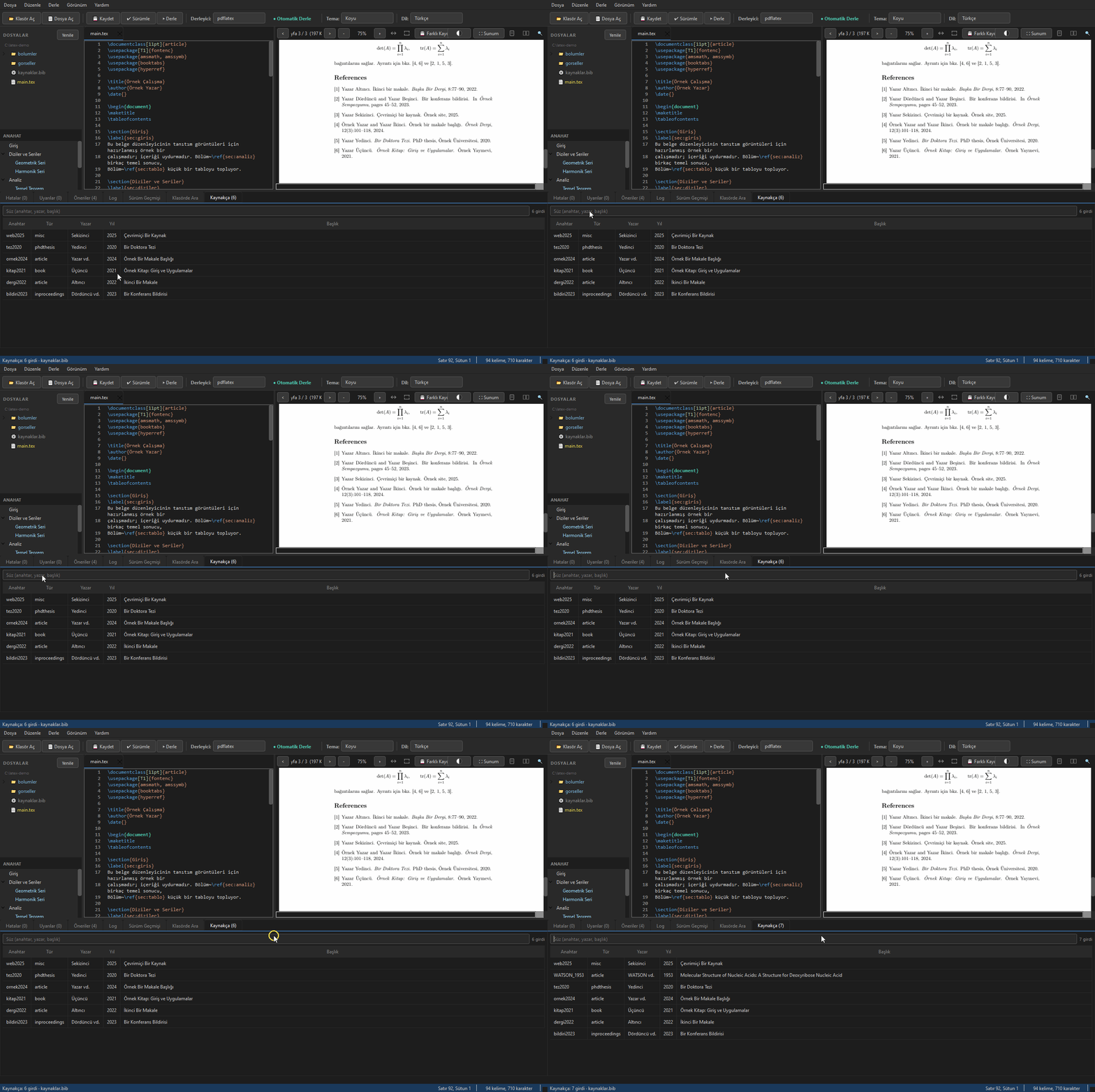
With auto compile on, saving rebuilds the document and refreshes the preview by itself. The PDF also scrolls to wherever your cursor was, so you land on the paragraph you were writing. Otomatik derleme açıkken kaydetmek belgeyi yeniden derler ve önizlemeyi kendiliğinden tazeler. PDF ayrıca imlecinizin olduğu yere kayar, yazdığınız paragrafın üstüne düşersiniz.
LaTeX is the worldwide standard for academic papers, theses, and technical reports, delivering powerful, professional output. Yet most popular tools in this space are online and cloud-based, which creates real constraints for academics and students: a constant need for an internet connection, sensitive work sitting on someone else's servers, and lock-in through subscriptions or sign-ups. Akademik makale, tez ve teknik rapor yazımında dünya standardı olan LaTeX, güçlü ve profesyonel çıktılar sunuyor. Ancak bu alandaki yaygın araçların büyük bir bölümü çevrim içi ve bulut tabanlı çalışıyor; bu durum, sürekli internet bağlantısı gerektirmesi, gizlilik taşıyan çalışmaların yine sunucularda tutulması ve abonelik ya da kayıt modellerine bağımlılık gibi konularda akademisyen ve öğrenciler için kısıtlamalar doğuruyor.
LaTeX Editor is a fully open-source, independent desktop app: writing, compiling, and PDF preview all happen on your own computer, with no internet connection. There is no cloud service, user account, or online session to depend on; once installed, it works offline (only the update check and adding a source by DOI use the network). That makes it a free alternative where connectivity is limited or where data privacy matters. Tamamen açık kaynaklı ve bağımsız bir masaüstü uygulaması olan LaTeX Editor, belgelerin yazılmasını, derlenmesini ve PDF olarak önizlenmesini internet bağlantısı olmadan, kullanıcının kendi bilgisayarında gerçekleştiriyor. Yazılımda herhangi bir bulut hizmetine, kullanıcı hesabına veya çevrim içi oturuma ihtiyaç yok; kurulduktan sonra çevrim dışı çalışıyor (internete yalnız güncelleme denetimi ve DOI ile kaynak ekleme bağlanıyor). Bu yönüyle internet erişiminin kısıtlı olduğu alanlarda ve veri gizliliğinin önemli olduğu çalışmalarda özgür bir alternatif sunuyor.
Handles ş, ğ, ı encoding issues that break compilation in IEEE/ASYU-style templates.IEEE/ASYU tarzı şablonlarda derlemeyi bozan ş, ğ, ı kodlama sorununu çözer.
Auto-fixes projects downloaded from Overleaf so they compile on your machine.Overleaf'ten indirilen projeleri otomatik düzeltir; yerelde derlenir.
Ctrl-click a source line → jump to the PDF. Ctrl-click the PDF → jump back. Even across pages.Kaynak satıra Ctrl-tıkla → PDF'e geç. PDF'e Ctrl-tıkla → geri dön. Sayfalar arası bile.
A desktop app, not a browser tab. Works without internet; no Overleaf compile limits.Tarayıcı sekmesi değil, masaüstü uygulaması. İnternetsiz çalışır; Overleaf derleme limiti yok.
Commands, comments, math, environments.Komutlar, yorumlar, matematik, ortamlar.
PDF in a side panel; save to compile. Pages are drawn for the screen's pixel density, so the text stays sharp on high-DPI screens.Yan panelde PDF; kaydet, derle. Sayfalar ekranın piksel yoğunluğunda çizilir, yazı yüksek DPI ekranlarda da keskin kalır.
Ctrl+S saves and compiles.Ctrl+S kaydeder ve derler.
lualatex (default), pdflatex and xelatex, auto-detected.lualatex (öntanımlı), pdflatex ve xelatex; otomatik algılanır.
Open a folder, file tree, multi-file tabs.Klasör aç, dosya ağacı, çoklu sekme.
Right-click the tree: new file, new folder, rename, delete. Renaming a file that is open moves the tab with it. Figure PDFs show up in the tree while build output stays hidden.Ağaçta sağ tık: yeni dosya, yeni klasör, yeniden adlandır, sil. Açık bir dosyayı yeniden adlandırınca sekme de taşınır. Şekil PDF'leri ağaçta görünür, derleme çıktısı gizli kalır.
Section tree in a side panel; click a heading to jump there.Yan panelde bölüm ağacı; başlığa tıkla, oraya atla.
Fold \begin/\end environments and section headings from the margin; a section folds together with its subsections.\begin/\end ortamlarını ve bölüm başlıklarını kenardan katla; bölüm, alt bölümleriyle birlikte katlanır.
Ctrl+F and Ctrl+H, with match case, whole word and regular expression; Ctrl+P opens any project file by name. Turkish words typed in capitals are found too (I and ı, İ and i).Ctrl+F ve Ctrl+H; büyük/küçük harf eşleştir, tam kelime ve düzenli ifade seçenekleriyle. Ctrl+P ile projedeki dosyayı adıyla aç. Büyük harfle yazılan Türkçe sözcükler de bulunur (I ile ı, İ ile i).
Ctrl+Shift+F searches inside every .tex/.bib/.cls/.sty file in the folder, including the ones you have not opened. Click a result to jump to that line.Ctrl+Shift+F klasördeki tüm .tex/.bib/.cls/.sty dosyalarının içinde arar; açmadıklarınız dahil. Sonuca tıklayınca o satıra gidilir.
Errors and warnings in separate tabs.Hatalar ve uyarılar ayrı sekmelerde.
When a compile fails on a missing .sty or font, the app names the exact package to install and gives you the command.Derleme eksik bir .sty ya da font yüzünden düşerse uygulama kurulacak paketi adıyla söyler ve komutu verir.
One dialog shows whether WSL, the TeX engines, biber, pandoc and synctex are ready, with a fix command for whatever is missing.Tek ekranda WSL, TeX motorları, biber, pandoc ve synctex hazır mı gösterir; eksik olana kurulum komutu önerir.
Dark, Light, Solarized, Dracula, Monokai, Nord, Gruvbox.Koyu, Açık, Solarized, Dracula, Monokai, Nord, Gruvbox.
Turkish and English interface.Türkçe ve İngilizce arayüz.
Section/heading structure in a side panel.Bölüm/başlık yapısı yan panelde.
Ctrl+F text search with highlighting; also finds words hyphenated at line ends.Ctrl+F metin arama, vurgulu; satır sonunda bölünen sözcükleri de bulur.
Drag to select, Ctrl+C to copy.Sürükle-seç, Ctrl+C ile kopyala.
Side-by-side pages.Yan yana sayfalar.
Ctrl+Space completes commands, \ref/\cite keys, and \input / \includegraphics paths.Ctrl+Space ile komut, \ref/\cite anahtarı ve \input / \includegraphics yollarını tamamlar.
Auto-indent and \begin/\end alignment.Otomatik girinti ve \begin/\end hizalama.
Live word and character count in the status bar.Durum çubuğunda canlı kelime/karakter sayısı.
Ctrl+V drops a clipboard image into media/ as a figure.Ctrl+V ile panodaki resmi media/'a figure olarak yapıştırır.
Compile errors flagged in the gutter; F4 jumps between them.Derleme hataları gutter'da işaretlenir; F4 ile dolaşılır.
Alt-click a \ref or \cite to jump to its label or bibliography entry.Bir \ref veya \cite'e Alt-tıkla; labelına veya kaynakça girdisine atla.
F2 on a \label or \cite key renames it everywhere it is used, across every file in the project.\label ya da \cite anahtarı üzerinde F2: projedeki tüm dosyalarda, kullanıldığı her yerde değişir.
Finds undefined \ref/\cite, unused .bib entries and labels, duplicate .bib keys and missing required fields; click a finding to jump. Optionally runs after each compile.Tanımsız \ref/\cite, kullanılmayan .bib girdisi ve label'ları, mükerrer .bib anahtarını ve eksik zorunlu alanı bulur; bulguya tıkla, yerine atla. İsteğe bağlı olarak her derlemeden sonra da çalışır.
Your .bib entries as sortable columns: key, type, author, year, title. Filter them, click a row to jump to the file. Hand-written bibliographies (\bibitem) are listed too..bib girdileri sıralanabilir sütunlarda: anahtar, tür, yazar, yıl, başlık. Süz, satıra tıkla, dosyadaki yerine git. Elle yazılmış kaynakçalar (\bibitem) da listelenir.
Paste a DOI, the entry is fetched and appended to your .bib. Month macro, page range and key collisions are fixed on the way in; you see the entry before it is written.DOI yapıştır, girdi getirilip .bib dosyasına eklensin. Ay makrosu, sayfa aralığı ve anahtar çakışması yolda düzeltilir; yazılmadan önce girdiyi görürsün.
Click \cite/\ref links inside the PDF to jump to the target.PDF içinde \cite/\ref linklerine tıkla; hedefe atla.
F5 opens the PDF fullscreen for talks. A presenter remote (Page Up/Page Down), the arrow keys, the mouse wheel or a click change slides; links on slides work and the cursor hides while you talk. The remote's blackout button blanks the screen.F5 ile PDF'i sunum için tam ekran aç. Sunum kumandası (Page Up/Page Down), ok tuşları, fare tekerleği ya da tıklama slayt değiştirir; slayttaki bağlantılar çalışır, konuşurken imleç gizlenir. Kumandanın karartma düğmesi ekranı karartır.
Invert the preview colours so the PDF matches a dark theme at night.Önizleme renklerini ters çevir; gece koyu temayla PDF de uyumlu olsun.
Convert to DOCX, Markdown or plain text via pandoc.Pandoc ile DOCX, Markdown veya düz metne çevir.
Detects external file changes and reloads safely, also in projects inside WSL.Dosyadaki dış değişiklikleri algılar, güvenle yeniden yükler; WSL içindeki projelerde de.
Ctrl+K saves a named snapshot; view diffs, restore a file, or copy old content. No git knowledge needed.Ctrl+K ile adlandırılmış sürüm kaydet; farkları gör, dosyayı geri yükle, eski içeriği kopyala. Git bilgisi gerekmez.
Unsaved changes are snapshotted every 30 seconds. If the app is killed or the power goes out, you are offered them back on the next launch. If a file changed on disk after the copy was made, you are told before restoring.Kaydedilmemiş değişiklikler 30 saniyede bir yedeklenir. Uygulama öldürülür ya da elektrik giderse bir sonraki açılışta geri yüklemen önerilir. Dosya kopyadan sonra diskte değiştiyse geri yüklemeden önce söylenir.
On by default: every 3 minutes (1 to 60, your choice) each edited file that already has a name is written. No dialog appears, no compile is started, and a file that changed on disk behind your back is never overwritten.Öntanımlı olarak açık: 3 dakikada bir (1 ile 60 arası, siz seçiyorsunuz) adı olan her değişmiş dosya yazılıyor. Kutu açılmıyor, derleme başlamıyor ve diskte arkanızdan değişmiş bir dosyanın üzerine yazılmıyor.
A Spell tab with a language selector and a Check button. Turkish and English dictionaries ship inside the app, so nothing is downloaded. It knows LaTeX: commands, keys, math and verbatim blocks are left alone, and words you add go to your own dictionary, where the Personal Dictionary window lets you take them out again. Clicking a finding selects the word.Panelde Yazım sekmesi, dil seçici ve Denetle düğmesi. Türkçe ve İngilizce sözlükler uygulamanın içinde geliyor, hiçbir şey indirilmiyor. LaTeX'i biliyor: komutlar, anahtarlar, matematik ve sözel bloklar denetlenmiyor; eklediğiniz kelimeler kendi sözlüğünüze gidiyor, Kişisel Sözlük penceresinden yeniden çıkarılabiliyor. Bulguya tıklayınca kelime seçiliyor.
Ctrl+T builds tables from a cell grid, CSV or pasted LaTeX code; aligns existing tables. The CSV separator is detected, including the semicolon of Turkish Excel, and you can also pick it yourself.Ctrl+T ile hücre grid'inden, CSV'den veya yapıştırılan koddan tablo üret; mevcut tabloları hizalar. CSV'nin ayracı kendiliğinden bulunur (Türkçe Excel'in noktalı virgülü dahil), elle de seçilebilir.
Common LaTeX errors get plain-language explanations and fixes.Yaygın LaTeX hatalarına sade dilde açıklama ve çözüm eklenir.
Ctrl+B in any chapter file builds the whole document; with auto-compile, Ctrl+S does too. The root comes from % !TEX root or, without it, from the \input/\include chain, whether chapters sit in a subfolder or right next to the root.Herhangi bir bölüm dosyasında Ctrl+B bütün belgeyi derler; otomatik derlemede Ctrl+S de. Kök belge % !TEX root yorumundan, o yoksa \input/\include zincirinden bulunur; bölümler ister alt klasörde ister kökün yanında dursun.
Pick the palette that fits your eyes.Gözüne uygun paleti seç.
Portable .exe. Requires WSL + TeX Live for compilation.Taşınabilir .exe. Derleme için WSL + TeX Live gerekir.
.AppImage. Requires TeX Live for compilation. Also on AppImageHub..AppImage. Derleme için TeX Live gerekir. AppImageHub'da da var.
.dmg. Requires MacTeX for compilation. Clear the download quarantine once after installing (see Setup)..dmg. Derleme için MacTeX gerekir. Kurduktan sonra indirme karantinasını bir kez kaldır (bkz. Kurulum).
⚠ The download includes the GUI only. The LaTeX compiler (lualatex/pdflatex/xelatex) is installed separately via TeX Live.⚠ İndirme yalnızca arayüzü içerir. LaTeX derleyicisi (lualatex/pdflatex/xelatex) TeX Live ile ayrıca kurulur.
The download is the GUI only: LaTeX compilation needs TeX Live. One-time setup:İndirme yalnızca arayüzü içerir: LaTeX derlemesi için TeX Live gerekir. Tek seferlik kurulum:
wsl --installwsl in PowerShell). On first launch, set a Linux username and password. Then update the package list and install TeX Live (large download, several GB):
Başlat menüsünden Ubuntu uygulamasını aç (PowerShell'de wsl yazarak da girebilirsin). İlk açılışta bir Linux kullanıcı adı/parolası belirle. Sonra paket listesini yenile ve TeX Live'ı kur (büyük indirme, birkaç GB):
sudo apt-get update
sudo apt-get install texlive-base texlive-binaries texlive-latex-base \
  texlive-latex-extra texlive-latex-recommended texlive-lang-european texlive-luatex texlive-xetex \
  texlive-fonts-extra texlive-science texlive-bibtex-extra texlive-font-utils \
texlive-extra-utils biber texlive-publishers texlive-humanities texlive-pstricks python3-pygments pandocsudo apt-get update
sudo apt-get install texlive-base texlive-binaries texlive-latex-base \
texlive-latex-extra texlive-latex-recommended texlive-lang-european texlive-luatex texlive-xetex \
texlive-fonts-extra texlive-science texlive-bibtex-extra texlive-font-utils \
texlive-extra-utils biber texlive-publishers texlive-humanities texlive-pstricks python3-pygments pandocchmod +x LaTeX_Editor_v*_Linux_x86_64.AppImagebrew install --cask mactex.dmg, drag the app to Applications, then clear the download quarantine once, otherwise macOS refuses to open it (the build is signed ad-hoc, not notarized):
.dmg'yi indir, uygulamayı Applications'a sürükle, sonra indirme karantinasını bir kez kaldır; yoksa macOS uygulamayı açmıyor (paket ad-hoc imzalı, notarization yok):
xattr -dr com.apple.quarantine "/Applications/LaTeX Editor.app".dmg:
Ya da .dmg yerine kaynaktan çalıştır:
brew install python
pip3 install -r desktop/requirements.txt
cd desktop && python3 main.pyThen launch the app, open a folder containing your .tex file, and press Ctrl+S to compile.Sonra uygulamayı aç, .tex dosyanın bulunduğu klasörü aç ve derlemek için Ctrl+S'e bas.
The GUI is native, but LaTeX compilation runs through TeX Live in WSL for a consistent toolchain across Windows, Linux and macOS.Arayüz yerel; ama LaTeX derlemesi Windows, Linux ve macOS'ta tutarlı bir toolchain için WSL içindeki TeX Live üzerinden çalışır.
Yes, write on Overleaf for collaboration, then download and compile locally. The editor auto-fixes Overleaf-downloaded files.Evet, Overleaf'te yazın (iş birliği), sonra indirip yerelde derleyin. Editör Overleaf'ten indirilen dosyaları otomatik düzeltir.
No. Editing and compiling work fully offline. Only two features reach the network: the update check (at startup, at most once a day) and adding a source by DOI. In versions after 1.1.1 you can turn off the startup check in View → Editor Settings. See the privacy policy.Hayır. Düzenleme ve derleme tamamen çevrim dışı. İnternete yalnız iki özellik bağlanır: güncelleme denetimi (açılışta, günde en çok bir kez) ve DOI ile kaynak ekleme. 1.1.1'den sonraki sürümlerde açılıştaki denetimi Görünüm → Editör Ayarları'ndan kapatabilirsiniz. Ayrıntı: gizlilik politikası.
Lighter, with built-in SyncTeX, Turkish-character handling for IEEE/ASYU templates, and Overleaf-import fixing. It also tries to keep you out of the toolchain rabbit hole: a failed compile tells you which package to install, and the environment check reports what is missing on your machine with the command to fix it. Open source under GPL-3.0.Daha hafif; yerleşik SyncTeX, IEEE/ASYU şablonları için Türkçe karakter desteği ve Overleaf-içe-aktarma düzeltmesi ile. Ayrıca sizi toolchain çukurundan uzak tutmaya çalışır: düşen bir derleme hangi paketi kuracağınızı söyler, ortam denetimi makinenizde neyin eksik olduğunu kurulum komutuyla birlikte raporlar. GPL-3.0 altında açık kaynak.